Purify Signature: A Modern Handwritten Script Font
There I was, staring at a blank brand board, trying to find the right tone for a new skincare line. The client wanted something elegant but approachable—something that felt personal, not too formal. That’s when I reached for Purify Signature. It wasn’t the first font I tried, but it quickly became the one that stood out.
What Is Purify Signature?
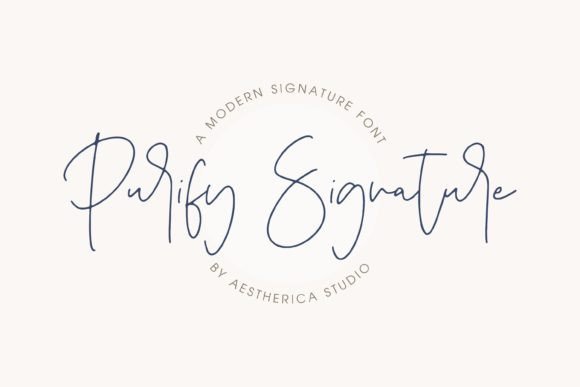
Purify Signature is a modern and simple handwritten script font. Its clean lines and subtle flourishes give it a contemporary feel, making it both fashionable and versatile. It doesn’t shout, but it doesn’t blend in either. There’s a quiet confidence in its design that makes it perfect for brands looking to balance style with readability.
Testing It in Real Branding Work
I used Purify Signature on a logo concept, a brand board, packaging mockups, business cards, website headers, and social media layouts. It held up surprisingly well across different scales and mediums. On a shop sign, it had a friendly, artisanal vibe. On a product label, it added a touch of sophistication without overwhelming the design.
One of the things I appreciated most was how it worked with other typefaces. When paired with a serif font for body text, it created a nice contrast that felt both professional and creative. With a sans serif, it brought a human touch to otherwise rigid layouts.
Strengths and Limitations
As a display font, Purify Signature excels. It’s ideal for headlines, logos, and short phrases where visual impact matters. But it’s not meant for long blocks of text. In small sizes or in dense paragraphs, it can become hard to read. That’s not a flaw—it’s just a reminder that this font works best as an accent or a highlight, not as a primary text face.
It also has a limited range of weights. While that’s fine for a script font, it means you’ll need to pair it carefully. If you’re looking for a bold version to use in a headline, you might need to rely on a separate font or adjust the weight manually.
When to Use It
Purify Signature is best suited for projects that benefit from a personal, handcrafted feel. Think boutique identities, café rebrands, handmade shops, or local restaurants. It adds warmth and character that can make a brand feel more authentic and relatable.
It also works well in digital spaces. On a website header, it draws attention without being distracting. In social media graphics, it helps create a cohesive visual language that feels consistent across platforms.
Font Pairing Advice
Pairing Purify Signature with a complementary typeface can elevate the entire design. A classic serif like Georgia or Playfair Display can add elegance, while a clean sans serif like Lato or Montserrat brings clarity. For a more modern look, try pairing it with a geometric sans like Futura or Helvetica Neue.
If you’re working with other script fonts, be careful not to overdo it. Too many scripts can create visual chaos. Stick to one or two and let them serve different roles—one for headlines, another for subheadings or accents.
Practical Considerations
Before using Purify Signature in client work, test it thoroughly. See how it looks at different sizes, on different backgrounds, and in various applications. Make sure it aligns with the brand’s personality and goals.
Also, check the licensing terms. Many premium fonts come with restrictions on commercial use, so it’s important to confirm what you’re allowed to do with the font. Whether you’re designing a website, printing packaging, or creating digital templates, understanding the license ensures you stay on the right side of the law.
Final Thoughts
Purify Signature is a solid choice for designers looking for a modern, stylish script font. It’s not perfect for every project, but when used correctly, it can add a unique touch that sets a brand apart. Whether you’re working on a logo, a packaging design, or a social media campaign, it’s worth considering as part of your typographic toolkit.
Just remember: great typography isn’t about finding the most popular font. It’s about choosing the right tool for the job. And in the right context, Purify Signature can be that tool.